
Everything Saksi does, and what it cannot
Saksi keeps a private history of the notifications your Android phone shows. Each feature below says whether it is in the current pre-release or planned, and where it has limits.
- In pre-release
- In the current pre-release.
- Planned
- Not in the app yet.
Capture
Saksi saves what Android shows in your notifications, from the apps you choose.

Saves the notifications you receive
In pre-releaseAfter you allow Notification Access, Saksi saves the text of notifications as they arrive, with the app, the conversation and the time.
Saksi saves what Android shows in notifications from the apps you allow. It cannot save messages that never appear as a notification or content an app hides.
Full message text
In pre-releaseLong and multiline messages are kept in full, not cut off like a collapsed notification.
Keeps the full text the notification provides.
Choose your apps
In pre-releaseEvery app is included by default, including apps you install later. Exclude any app in Settings, Capture & Apps, App Filter, and Saksi stops saving its new notifications. History already saved stays until the 7-day cleanup removes it. Saksi never saves its own notifications.
Capture status
In pre-releaseSettings, Capture & Apps shows whether Saksi is connected, with a Fix setup button that opens Android Notification Access.
Capture status shows whether Saksi is connected and when it last saw WhatsApp or Telegram notifications.
WhatsApp and Telegram
Extra handling for the two messaging apps people ask about most, based only on what their notifications show.
WhatsApp chats
In pre-releaseNew messages are saved. In one to one chats, proven edits are marked Message edited, and a message that disappears from the notification is labelled as a possible deletion. WhatsApp groups use the same handling but have not had their own test run.
Works with the notifications WhatsApp shows on your phone. Saksi is not affiliated with WhatsApp.
Telegram chats, groups and channels
In pre-releaseOne to one chats get proven edits and possible deletions. In groups and channels, changes are shown as Updated and deletions are not guessed.
Works with the notifications Telegram shows on your phone. Saksi is not affiliated with Telegram.
Timeline, search and filters
One place to scroll back through what your phone told you.
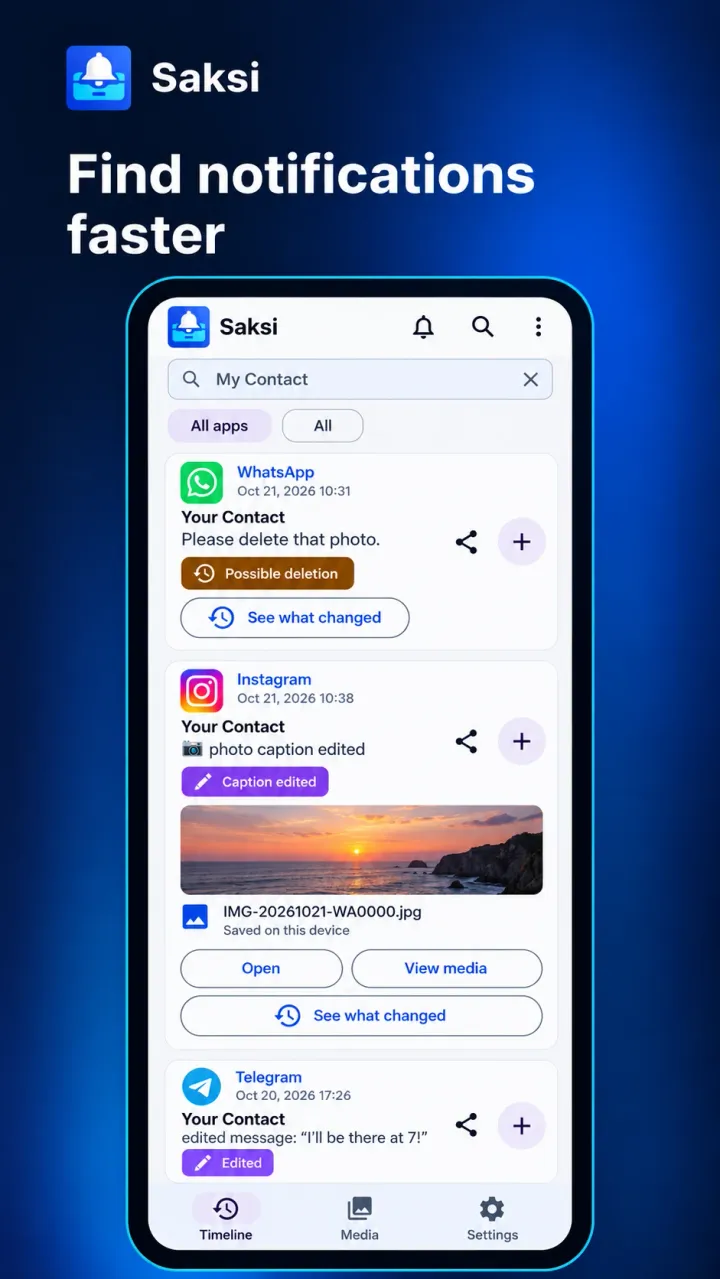
Timeline
In pre-releaseEvery saved notification in order, newest first, with its app, conversation, time and label.
Search
In pre-releaseFind a message by a word you remember.
Search the text, conversation names, app names and file names Saksi saved.
Filters
In pre-releaseFilter by app, or by event: All, New, Thread, Deleted, Updated, Edited, Cleared and Dismissed. The Deleted filter also shows possible deletions.
Conversations
In pre-releaseOpen a conversation to read its saved messages in order.
Edits and deletions, labelled by certainty
A notification can change or vanish for many reasons. Saksi tells you what it saw and what it cannot confirm.
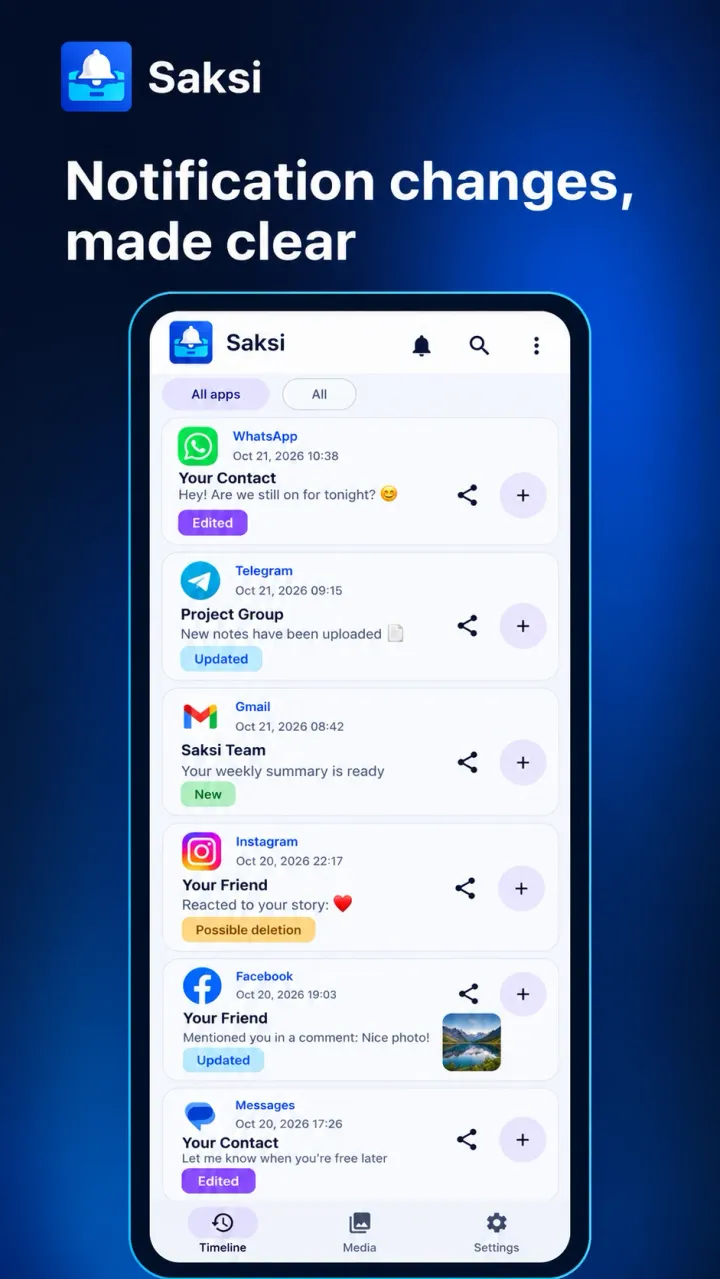
Message edited and Caption edited
In pre-releaseMessage editedCaption editedWhen a WhatsApp or Telegram one to one chat notification proves an edit, Saksi keeps the earlier version. Tap See what changed to compare them.
Saksi can keep the earlier version only if the app updated its notification when the message was edited. In some other messaging apps the same badge can appear for an unconfirmed change.
Updated
In pre-releaseUpdatedThe notification changed, but Saksi cannot prove it was an edit. Telegram groups and channels always use this label.
Possible deletion (unconfirmed)
In pre-releasePossible deletion (unconfirmed)A message that was in a WhatsApp or Telegram one to one chat notification is no longer there. Saksi keeps what it saw before.
Possible deletion means a message disappeared from a notification. It is not proof that the sender deleted it.
Deleted
In pre-releaseDeletedUsed only when the messaging app's own notification says the message was deleted. Saksi keeps what it saw before.
Today Saksi recognizes this notice from WhatsApp, in English and Indonesian. Any other disappearance is shown as a possible deletion, which is uncertain.
Dismissed and Cleared mean a notification was removed by you, the app or Android. Neither is ever treated as a deletion.
Alerts and the Alerts inbox
Find out when something changes, without opening the app.
Alerts for edits and deletions
In pre-releaseSaksi can alert you about proven edits, deletion notices and possible deletions. Each kind can be switched off in Message alerts.
Alerts are normal Android notifications. Your notification and Do Not Disturb settings decide whether they pop up. Possible deletions are always labelled as possible.
Alerts inbox
In pre-releaseEvery alert is also kept in the Alerts inbox inside Saksi, even if Android hides or blocks the pop up.
Lock screen privacy
In pre-releaseTurn off message previews in alerts, or hide Saksi alerts from the lock screen completely.
Saksi alerts are marked private, so your lock screen settings decide whether their text shows.
Photos and files
Saksi keeps the files Android lets it read, and tells you plainly when it cannot.
Media tab
In pre-releaseBrowse saved photos and files, and file references, filtered by type, app and availability.
Saksi saves a copy of a photo or file only when Android gives it access. Often only the file name or type is available, and Saksi says so.
Import a file
In pre-releaseIf a notification did not provide a readable file, choose the file yourself to keep a local copy.
Imported files are kept on your phone and are not linked to a conversation.
Clear limits
In pre-releaseFiles over 20 MB are not saved, and saved media is capped at 200 MB in total. Captions are kept as text even when the photo itself cannot be saved.
Receipts and sharing
Share one message as a clean receipt instead of a screenshot of your whole chat.
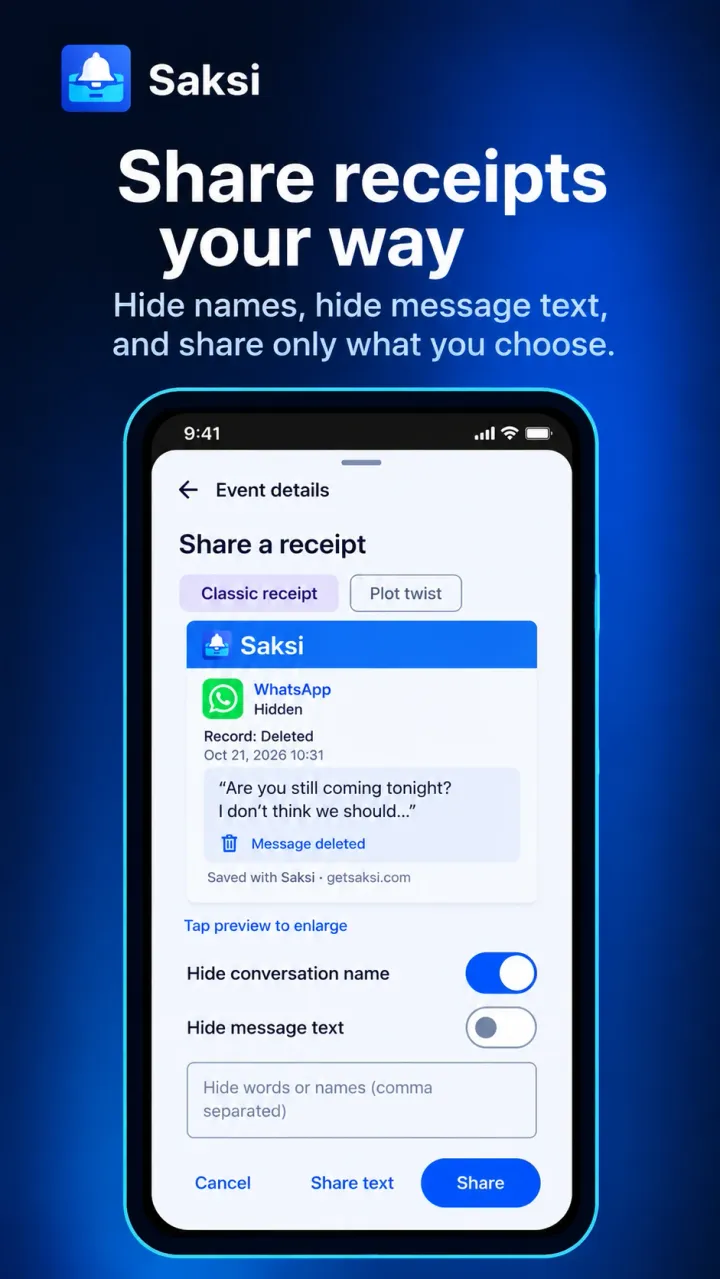
Receipts as an image or text
In pre-releaseTurn a saved message into a Saksi receipt. Two styles today: Classic receipt and Plot twist.
A receipt shows what your phone's notification showed. It is not verification by the messaging app.
Hide details before you share
In pre-releaseHide the conversation name, the message text or specific words before you share.
Android share sheet
In pre-releaseSend a receipt or a saved file to any app through Android's share sheet.
Saved content leaves your phone only when you tap Share.
Premium receipt templates
PlannedMore receipt designs as part of the planned Saksi Pro.
Saksi Pro is planned and not available yet.
Pricing
Retention and your data
Your history has a clear lifetime, and you can erase it whenever you want.
7-day local archive
In pre-releaseThe free archive keeps the last 7 days on your phone.
The free plan keeps 7 days of history. Older items are deleted automatically, about once a day, and cannot be restored.
Delete all data
In pre-releaseErase Saksi's archive, saved files and alerts in one step from Settings, Archive & Storage, or from the Timeline menu.
Delete all data erases Saksi's archive, saved files and alerts on your phone, then pauses capture. It does not delete messages in other apps or copies you already shared.
30-day history
PlannedA longer rolling history as part of Saksi Pro.
Saksi Pro is planned and not available yet.
Pricing
Languages and appearance
Saksi speaks your language, including right to left.
8 languages
In pre-releaseEnglish, Bahasa Indonesia, Español, Português (Brasil), Français, Deutsch, हिन्दी and العربية. Change it in Settings, Language & Appearance.
Right to left layout
In pre-releaseIn Arabic the whole app mirrors to read from right to left.
Light and dark theme
In pre-releaseFollow your system theme, or pick Light or Dark.
Built-in Help
In pre-releaseHelp & Support inside the app explains labels, setup and storage in all 8 languages.
What Saksi does not do
Knowing the limits up front saves you a surprise later.
- Saksi is not a recovery tool. It cannot bring back messages from before you turned it on, or from chats that never showed a notification.
- It cannot open other apps or their storage, and it cannot confirm what the sender did.
- There is no cloud backup or sync, and Saksi has no feature to move history to a new phone. On some phones, a direct phone to phone transfer can still copy app data.
- There is no full archive export. You share one message at a time as a receipt.
- Saksi is for Android only. There is no iPhone version.
Learn more in the docs
- Getting started with Saksi(opens the docs site)
- Supported apps(opens the docs site)
- Edited messages(opens the docs site)
- Deleted and disappeared notifications(opens the docs site)
- Search and filters(opens the docs site)
- Photos and files(opens the docs site)
- Receipts and sharing(opens the docs site)
- How long history is kept(opens the docs site)
- Delete all data(opens the docs site)
See how setup works
One Android permission, then your Timeline fills as notifications arrive.